
This article was updated in September 2026.
Book Creator is a digital book creation tool designed for educators and their students. It is designed to foster creativity by giving students a platform on which to write novels, comic books, and interactive books with audio and visual components. These books can serve as the lesson in their own right or be linked to other topics from math to science to history and more.
A few years ago, educator Mike Afdahl told me Book Creator is one of his favorite apps for fostering creativity. “Any age and technological skill set can create and publish their own book,” says Afdahl, Coordinator of Technology Services for Northwest GA Regional Educational Service Agency (RESA).
I agree. I first wrote about the tool in the early 2020s and have been impressed with it ever since. While the term “book” conjures writing and a text-based platform, Book Creator’s capabilities go well beyond this. Students can incorporate recordings and other multimedia elements.
Writing is linked to cognition in so many ways, and by writing and creating multimedia projects about a topic, students can really internalize their learning. Creating a Book Creator project is also a method of creating work that is more resistant to inappropriate AI use. Book Creator also prides itself in being accessible with more than 130 built-in accessibility features and plenty of templates and resources to help all educators and their students get started.
Here’s everything you need to know about Book Creator.
What is Book Creator?
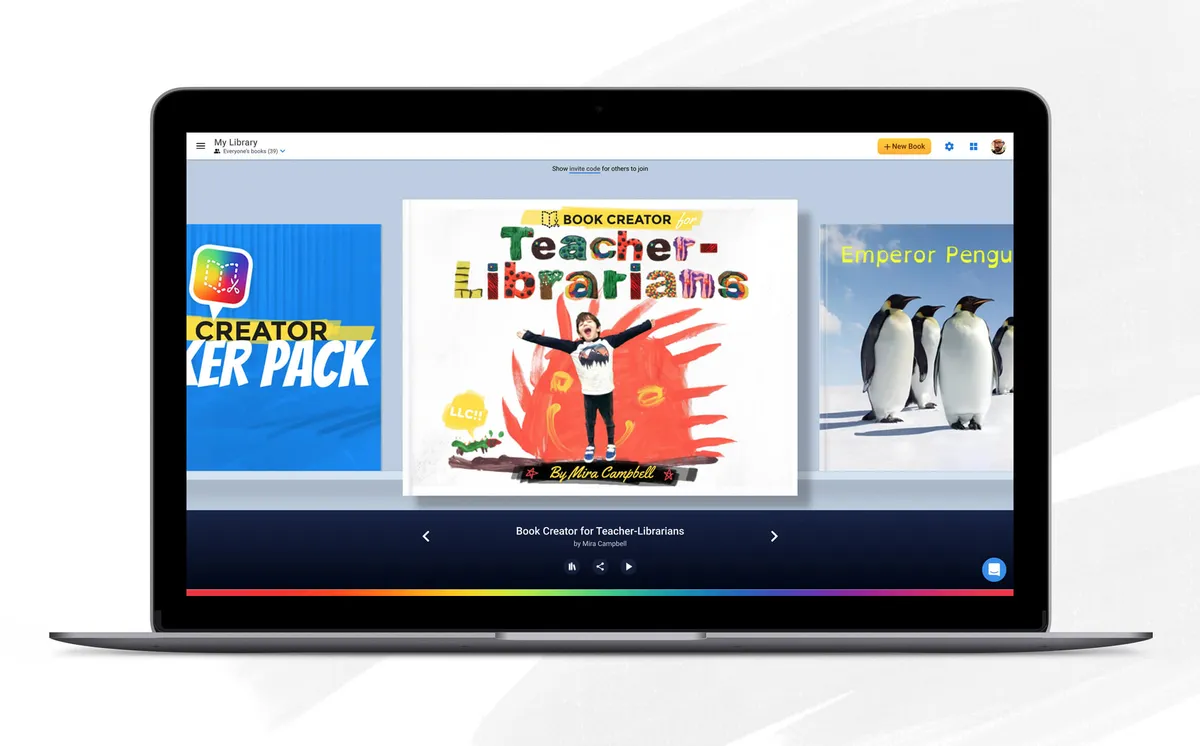
Book Creator is designed to teach students by getting them excited about creating their own books on the topics they are learning about. Students can upload images, choose from emojis, make recordings and videos, and create and then share a finished book they wrote.
These ebooks can take various forms, from digital portfolios to comics and scrapbooks to manuals and poetry collections.
The free version of the tool allows educators to create a library of 40 books. Book Creator includes many templates to make creating various book projects easy and straightforward. Educators can also use it to assign material to students in interactive book form.

What's New In Book Creator
Book Creator recently added Class View, which allows educators to see every book and every page their students are working on in one, streamlined view. With this time-saving feature, they can track progress and more easily provide feedback.

Also semi-recently, AI Literacy Page Templates were introduced to help students better understand and use artificial intelligence. These interactive templates allow teachers to integrate AI conversations into their lessons and provide students with structured opportunities to build skills in critical thinking, creativity, and ethical awareness.
In September 2025, Book Creator was acquired by Kami, and has been integrated into its family of products and platforms. As such, it brings student expression and authentic evidence into the wider learning journey.
How Does Book Creator Work?
Book Creator was conceived in 2011 after Dan Amos and his wife, children’s author Ally Kennen, saw that their 4-year-old son (later diagnosed as dyslexic) was making slow progress with the school reading scheme.
After trying unsuccessfully to get him more engaged, they wondered what would happen if they made their own books about things he loved, including Star Wars, pets, and his family. They also wanted to get him as interested in reading as he was in using a tablet.
Amos was inspired to launch Book Creator, and today, the educational tool remains built around engaging children such as his son and making them excited about reading and creating. Teachers can have students create a science book based on a key concept from class or they can design poetry workbooks, complete with illustrations and recorded readings.
To set up a free account, which gives access to most of the app’s features, teachers should visit Book Creator’s pricing website. They then click on the free option and select the school where they work -- the program is for classroom use only.
Once they’ve signed into Book Creator they’ll be able to make their own books starting from scratch or choose from existing templates, which include themes such as newspaper, magazine, photo book, and more. Educators can then create their “library,” which can be shared with students. They’ll also get an invite code to invite students to start using the app.
Pricing
The free version of Book Creator gives educator’s access to 40 books, but lacks some features of the paid version including real-time collaboration.
Individual teachers can pay $14 per month, which allows them and their students to create up to 1,000 books and also provides access to support and ideas from other teachers using the app.
Volume pricing is available for schools and districts but varies depending on the number of teachers who will be using the Book Creator app.
Book Creator Tips & Tricks
Create an “About Me” Book
A great way to get your students using Book Creator and learning more about one another is to have them create an “about me” page using the app. This can include a short bio and photo, for starters.
Assign Student Stories, Poems, and Written Projects of all Kinds
This is maybe the most straightforward use of the app, but it’s an important one. Students can use Book Creator to write, illustrate, and add video and audio recordings to their written work.
Support STEM Lessons
The app can provide a great opportunity for students to organize thoughts and show their work in math and science. For example, science students can write or record their predictions before testing a hypothesis, then compare and contrast results.
Produce Musical Ebooks
Book Creator’s recording abilities provide many different ways to utilize it in music class. An educator can write out music and have audio recordings embedded for students to play along with.
Create Comic Books
Encourage students to create their own superheroes with the popular comic book template on Book Creator and have them tell stories and/or share work in a variety of topics.
Support SEL Lesson Plans
Students can create books, comics, etc., to be collaborative and learn team-building. Or assign them to interview members of their communities and share these interviews in Book Creator.
Use Book Creator’s “Read to Me” Function
The “Read to Me” function on Book Creator is one of the app’s most versatile capabilities. It allows users to have the ebook created on the app read to them in various languages while highlighting the word being spoken. This can help early readers learn to read, or provide an opportunity to practice proficiency in English or a foreign language.

